Understanding AI Coding (2): Challenges and Development Strategies
Introduction
In Part 1, I looked back on eight months of AI coding. This article draws on that experience to discuss its difficulties and strategies for development.
Imagine arriving at work one day to find that every employee has gained a hundred teammates who can plan products, design, and develop software.
Product planners can now use AI to implement their ideas without waiting for developers. Building an entire complex service may be difficult, but creating a frontend mockup that demonstrates screens and user flows is well within reach.
As screens become faster to build, developers face more pressure to implement the backend quickly.
Fortunately, developers have also gained a hundred teammates. Unfortunately, dividing work among them and verifying the results is difficult.
1. Why Is Delegating to AI Difficult?
With AI handling implementation, one developer can take on more work across a broader scope. Developers spend more time setting goals, dividing work among AI agents, and verifying and integrating the results. They have suddenly gained considerable power, but may not yet be comfortable with their new role.
1.1. Limited Experience Writing Tests
Even if AI implements quickly, slow verification makes it difficult to accelerate development. Developers can only check so many results individually, which makes test automation important.
Tests are the goals of the work we delegate to AI. When delegating backend implementation, we should therefore use TDD: define the behavior and expected results through tests first. Without verification criteria established in advance, AI may verify its work in the wrong way.
But writing tests before implementation is not easy. Developers accustomed to working out behavior as they code may find it unfamiliar to define input conditions and expected results first and express them as tests.
Deciding what to test and how much to test also requires experience. Some developers think every internal function needs a unit test. When tests depend too heavily on internal implementation, restructuring the implementation also requires changing tests, even though externally visible behavior has not changed.
Developers must also review AI-written tests to make sure they actually verify the requirements. AI sometimes writes many unnecessary or duplicate tests. As they accumulate, verification takes longer and development slows down.
1.2. Unfamiliarity with Top-Down Development
Sometimes we implement a feature by first creating database tables, then writing code to read and write data, and finally adding APIs. We work out the behavior and overall structure as we code. This is an example of bottom-up development, starting from implementation details.
If you have designed this way, you may find it difficult to make a task’s goal concrete before delegating implementation to AI. Ask only “Implement product search,” for example, and AI will choose the search conditions, response format, and internal structure itself. If its decisions differ from your intentions, you will inspect the result, revise the instructions, and assign the same task repeatedly.
Reducing that rework requires top-down development: begin with requirements, define behavior and structure, and turn them into concrete implementation tasks. Use UML or similar tools to organize component responsibilities and interfaces, then set the task’s goal and verification criteria before delegating implementation.
This kind of design is not easy. Choosing an appropriate architecture and maintaining a suitable structure as features grow and requirements change requires flexible thinking: applying design principles to the situation at hand.
If you have understood and verified behavior by reading implementation code, delegating implementation based on designs and tests can feel unsettling. It is like navigating a submarine without seeing outside, relying on instruments and detection equipment.
Developers now need to become designers. A deep understanding of design patterns and architecture, together with experience applying them in actual projects, has become more important than ever.
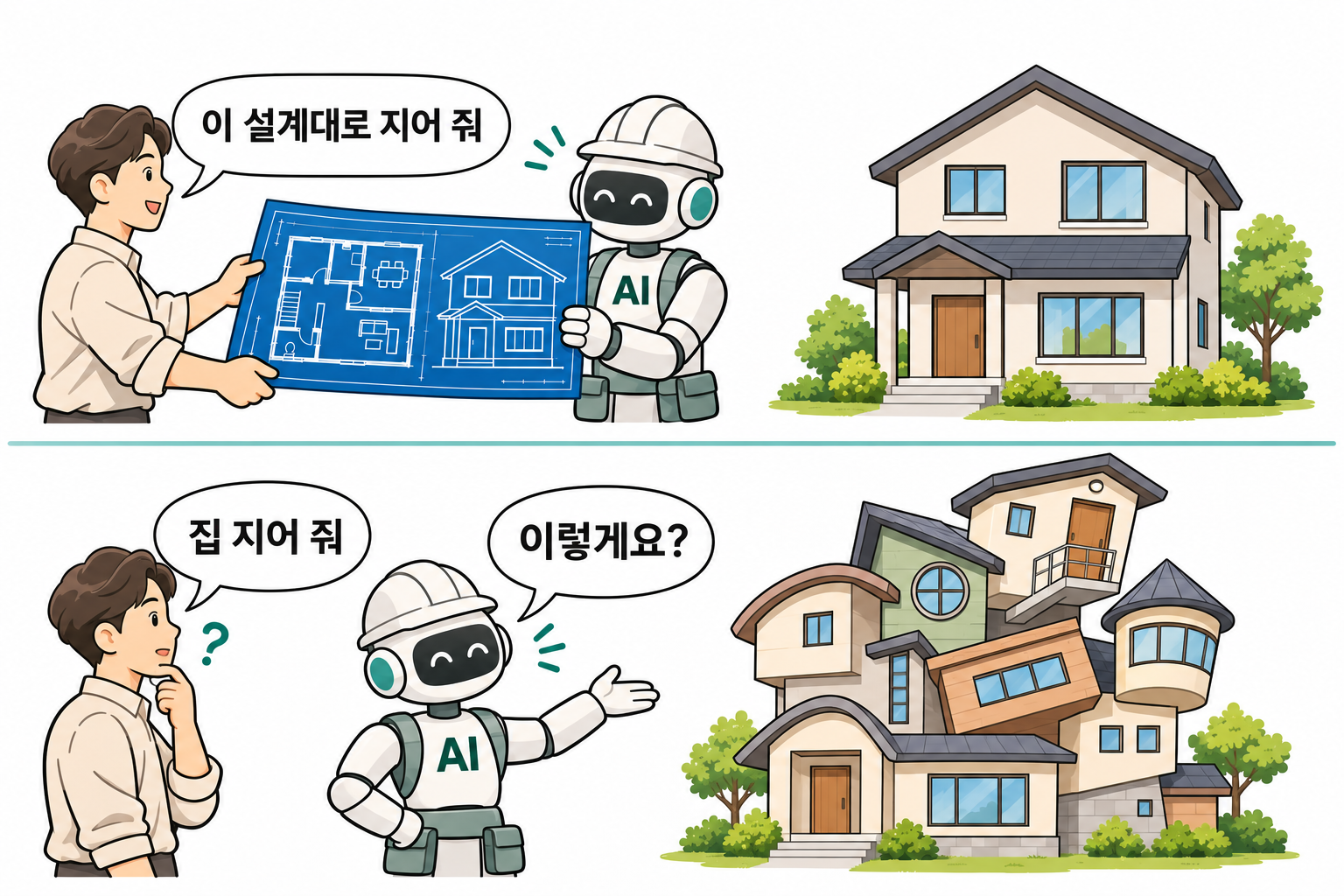
The Korean speech bubbles read: “Build it according to this design” in the upper scene; “Build me a house” and “Like this?” in the lower scene.
AI can produce an initial design. But the developer must make the final review and refine it to fit the requirements and project.
1.3. Projects Grow Quickly
In a small project, we could compensate for weak design or missing automated tests by inspecting and running the code ourselves. But when AI coding makes a project grow quickly, checking code one piece at a time and keeping all the work in our heads becomes difficult to sustain.
As features increase, so do dependencies on one another’s data and behavior. Without experience working at that scale, it is easy to miss the point when refactoring is needed. Adding features without reorganizing the structure can rapidly increase complexity. If further features are built on unfinished ones, completing a single feature may eventually require changes to several others.
Without experiencing the benefits of test automation, it is easy to postpone writing tests under a busy schedule, even while recognizing their value. That experience matters more as projects grow. Having caught errors early with tests and safely modified existing features helps you decide how to divide time between implementation and verification.
There are also more tasks to manage. Delegating to several AI agents at once makes it more complicated to define scope, set priorities, and track progress. Without an organized record of task status and history, follow-up work can be missed, or important tasks can be displaced by whatever appears next. Other team members also struggle to see what is complete and what remains.
The faster AI completes tasks, the more result reports developers have to review. If you skim them and keep assigning work, you may lose track of changes until even AI’s explanations become difficult to understand. Eventually, you may be unable to choose the next task yourself and simply follow its suggestions.
1.4. Existing Development Practices Are Hard to Change
A project’s design, code, and testing environment are interdependent. If you continue adding features on a weak foundation, changing how you develop becomes harder later.
Without a clear design, you first need to determine the responsibilities and dependencies of the features related to a change. If components are tightly entangled, you may need to reorganize the code and execution environment before you can even write tests.
In an environment where AI cannot run tests itself, a person must check behavior after every code change. However fast implementation becomes, verification and communicating the results remain limited by human speed. The environment and tools must allow AI to run tests and verify its changes.
Product planners and designers also have established ways of working. Even if AI makes new divisions of responsibility possible, the way people communicate requirements and review results will not change immediately. Adjusting to one another’s practices can take more time and effort than expected.
2. How AI Coding Changes Development
I covered specific methods for analysis, design, and testing in Backend Service Analysis and Design.
This section looks at how development practices can change with AI coding.
2.1. Development Strategies
Here are a few approaches that AI makes possible.
Product Planners Implement Their Own UIs
Product planners can use AI to implement the interfaces they envision. By explaining their ideas, they can create screens and user flows, then interact with them to clarify required features and missing business rules.
Developers set up the project so that planners can ask AI for changes and run the updated screens. If the backend is not ready, the screens can run with sample data. Developers resolve environment or execution problems that block progress.
Develop a Prototype and Production System in Parallel
We can go further by developing a prototype and production system separately, in parallel. Previously, maintaining two projects required more people and time. Now a planner can build and modify the prototype directly with AI, reducing the developer’s workload.
The planner and developer use the prototype to agree on the scope and priority of features for the production system. The developer refines their business rules, designs the APIs and data structures, and delegates implementation to AI. While the developer adds testing and operational requirements and integrates the features into the service, the planner can keep experimenting with new ideas in the prototype.
Take Full-Stack Responsibility for Several Services
Implementing both frontend and backend manually requires learning many technologies and understanding a great deal of code. Teams have therefore often used separate frontend and backend developers, allowing each to focus on their area.
When AI handles implementation, one developer can be responsible for both. The developer designs the behavior and interfaces from the screens through the APIs to the database, then reviews and integrates the implementation of each part.
Just as AI helps us work across technology stacks, it also lets us develop several services in parallel.
Changes in Who Leads Development
Implementation used to take considerable time, and revising an approach after trial and error was expensive. The development team’s judgment therefore carried weight in decisions about feature scope and development methods. Nondevelopers found technical judgments difficult to assess, which could give the team’s position even more influence.
Depending on the project, a product planner may now lead development by implementing and revising ideas directly with AI. The developer reviews the results and improves the structure and quality needed for production.
There is no fixed arrangement. We need to keep considering which approach works best in the current situation.
2.2. Task Management
Teams that plan and review work in regular cycles, such as Scrum, can adjust task management to reflect AI coding’s implementation speed and changing division of responsibilities.
Larger Work Items
Previously, even a single feature involved collaboration between a planner and several developers, and implementation took considerable time. Work was tracked in relatively small items to divide responsibilities and monitor progress.
With AI coding, one person can cover a wider scope in less time. Work previously split across several people can therefore be combined into larger items.
Suppose developing product search takes about five days and is divided into these tasks:
- Design the product search API
- Implement the product search API
- Implement the search screen and integrate the API
If one person can use AI to complete design, implementation, and verification within a day, tracking the process as one work item is more efficient. It can remain one item in the task tracker while being divided into smaller assignments for AI as needed.
Shorter Iterations
When AI finishes work faster, we also need to reconsider how often results are reviewed and the next tasks are selected.
If a planner first uses AI to create something that works and then requests a technical review, meetings to explain and confirm screens and user flows can be reduced or skipped. Exchanging results and review comments on work items allows follow-up work to be decided without waiting for a regular meeting.
If reviews and discussions can happen as needed, teams can shorten or remove fixed iteration cycles, review completed work, and move on to the next task. Verified changes should still be integrated continuously so that the system remains usable.
Automating Task Management
Connecting AI to a task tracker reduces the need for developers to relay each task or copy results between tools. AI can read work items directly and update their status and results.
In an actual project, I had AI leave completion reports as comments on work items and update their status. This is the GitHub Projects Kanban board we used.
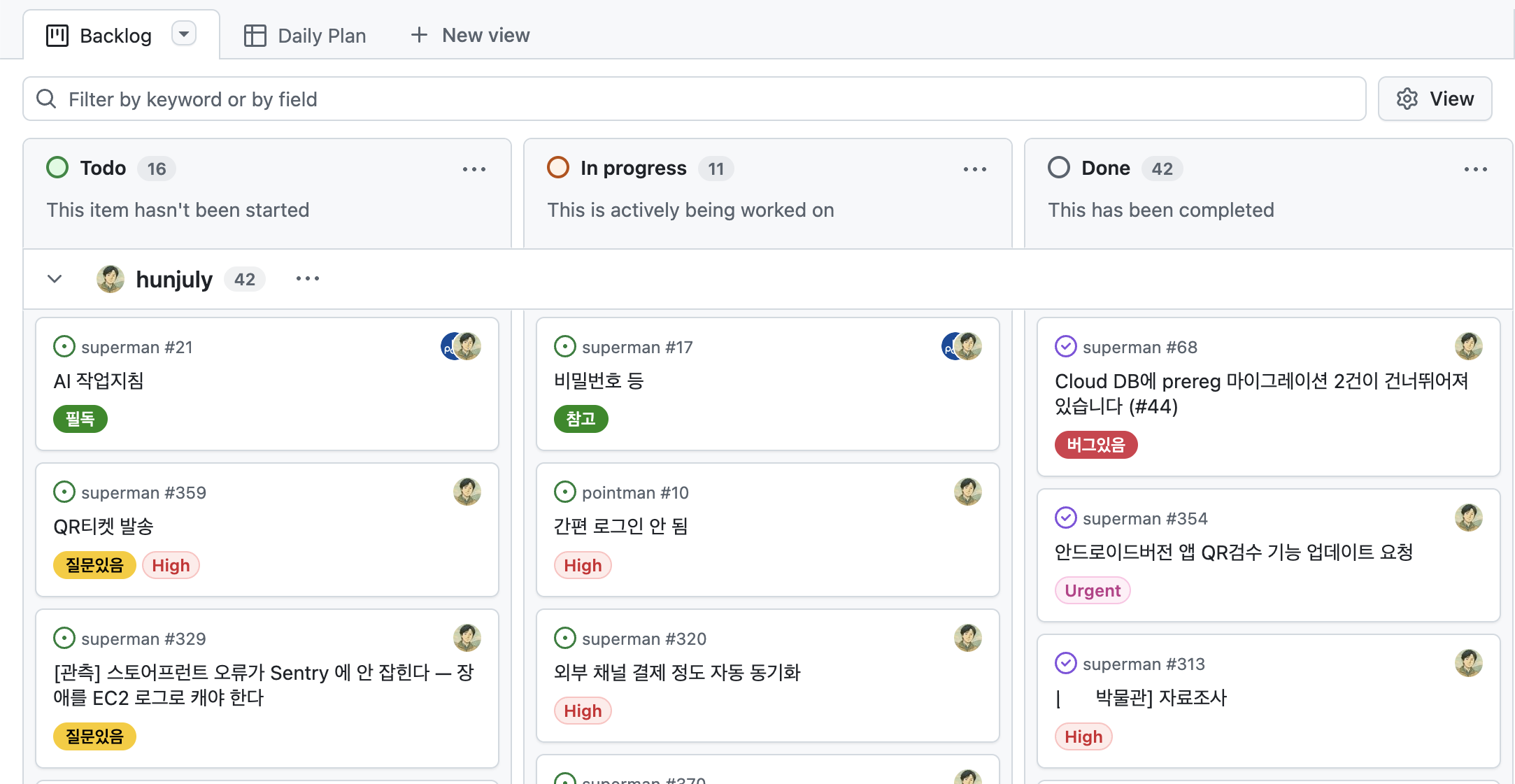
Keeping completion reports on their work items brings requirements, changes, and verification results together. It also reduces the need to accumulate separate task reports as documents in the code repository.
After completing a task, AI can check priorities and whether prerequisites are complete, then choose and process the next task. Problems and follow-up work discovered along the way can be registered and linked to related tasks, with matters requiring human judgment flagged.
Agents can also exchange requests and responses through work items. Having one AI handle both frontend and backend reduces coordination. If separate agents are needed, the frontend agent can request an API or change through a work item, and the backend agent can record the result. The frontend agent then uses that result to continue integration.
In this way, the task tracker can become a control center for assigning work to multiple AI agents, tracking progress, and reviewing results.
2.3. Design
Less Work to Get a Design Started
AI makes it easier to begin a design and make it concrete. Turning abstract requirements into a design from a blank page can feel daunting. But describing the desired features and constraints to AI gives you an initial design. Developers can review it to identify missing requirements and refine the structure.
How we receive requirements has changed too. Previously, frontend and backend developers sometimes had to start implementing simultaneously based only on a planner’s explanation. Without concrete screens or user flows, each had to anticipate the necessary behavior, making API and system design difficult.
Now planners can use AI to build working screens that demonstrate their ideas. Developers can run those screens, examine the user flows and required behavior, and use them to define APIs and business rules.
Revising designs can also be less burdensome. With manual coding, large-scale refactoring took considerable time and effort, encouraging more cautious design. With a solid test suite, however, AI can reduce the cost of refactoring. Refining a design when requirements become clear may be more efficient than trying to anticipate uncertain requirements in advance.
When I delegate design, AI still seems like a convincing imitator. I therefore do not recommend leaving both design and review entirely to AI agents. If no experienced developer is available to review a design, though, having another AI review it may be the next-best option.
Analyzing Existing Projects
The way we use UML can change as well. If screens and APIs make behavior sufficiently concrete, we may need less of the step-by-step process of organizing requirements with UML.
I now use UML more often to analyze projects I have just joined than to design new ones. When asked to analyze something, AI often responds in prose. Asking it to draw complicated or unclear parts in UML has made component relationships and behavioral flows much easier to understand.
If the code is so tangled that even UML does not clarify its structure, rebuilding may be worth considering. An existing working product can serve as the basis for identifying required features and delegating everything from analysis to implementation. When the required functionality is clear, rebuilding with AI may be faster than continuing to patch the existing code.
2.4. Testing
Backend
AI also reduces the burden of writing tests. Describe a task, and it can produce both a draft design and test code.
Developers often say that reviewing AI-written implementation code is difficult. Tests are like a steering wheel for AI. For backend work, it is more efficient to leave implementation code to AI as much as possible and focus on reviewing and improving tests.
AI tends to write more tests than necessary. Without review, meaningless or redundant tests accumulate and execution slows down. Tests coupled to internal implementation are particularly troublesome: a small implementation change can require updates to many tests. Tests intended to support refactoring become a burden instead.
How many tests should we write? There is no fixed answer. I keep test code as short as possible while maintaining 100% coverage. I use coverage to check whether I have missed anything that should be tested.
Some consider 100% coverage excessive, but I disagree, at least for backend code. I exclude code that has no meaningful reason to be tested, documenting why, and test the rest without omissions. Since AI coding makes writing tests easier, I wonder whether this standard could apply to most projects.
I do not often run load tests to measure system limits, but I run concurrency tests around the clock on a spare PC. Even a small change can introduce concurrency problems, which are difficult to reproduce and diagnose and can have severe consequences such as data corruption.
Frontend
I write very few frontend tests. In my experience, their benefits do not justify the work of updating them as screens change. When nondevelopers use AI to build a frontend, expecting them to write and maintain tests is also unrealistic.
Instead, I run monkey tests—randomly repeating clicks and inputs—around the clock to catch exceptions caused by unexpected sequences of actions. They cannot find every error, but their low maintenance cost as screens change makes them cost-effective.
These methods are only examples. A testing strategy should fit its project.
2.5. The Development Environment
Managing Code Quality
AI generates code so quickly that developers can no longer review every change themselves. Maintaining code quality requires greater reliance on tools that enforce coding rules, such as linters and formatters.
Small development teams may previously have lacked the capacity to configure these tools carefully. Now they can describe the rules they need and ask AI to configure them.
For example, I prefer a backend architecture with small services and restrictions on dependencies between them. I used to check for violations manually. When I explained the rules to AI and asked whether a linter could enforce them, it configured the checks immediately. Without AI, I would not have known this was possible.
Use the linter’s existing rules where possible, and add custom rules when an essential check is missing.
For aspects that are difficult to check with a linter, define review criteria and have AI periodically inspect the whole project.
Repositories and Workspaces
Repositories used to be divided by responsibility, such as frontend and backend, so each developer could focus on their own code and development environment.
If one AI handles both frontend and backend implementation, however, a monorepo containing the related projects is convenient. It can change an API and the screens that call it together, keeping the related changes in one commit.
Workspaces, like repositories, are better unified.
In a recent project, the Android kiosk app and backend had separate workspaces. The Android app needed to run on the development PC, while the backend ran on a remote server.
I needed to check that a payment made in the app was handled correctly by the backend. But separate AI agents were running in the two workspaces, so I had to coordinate their work.
As a workaround, I had the agents request work through a task board and check and respond to each other’s requests. Looking back, it would have been easier to combine the repositories and workspaces so that one agent could modify and verify both the app and backend.
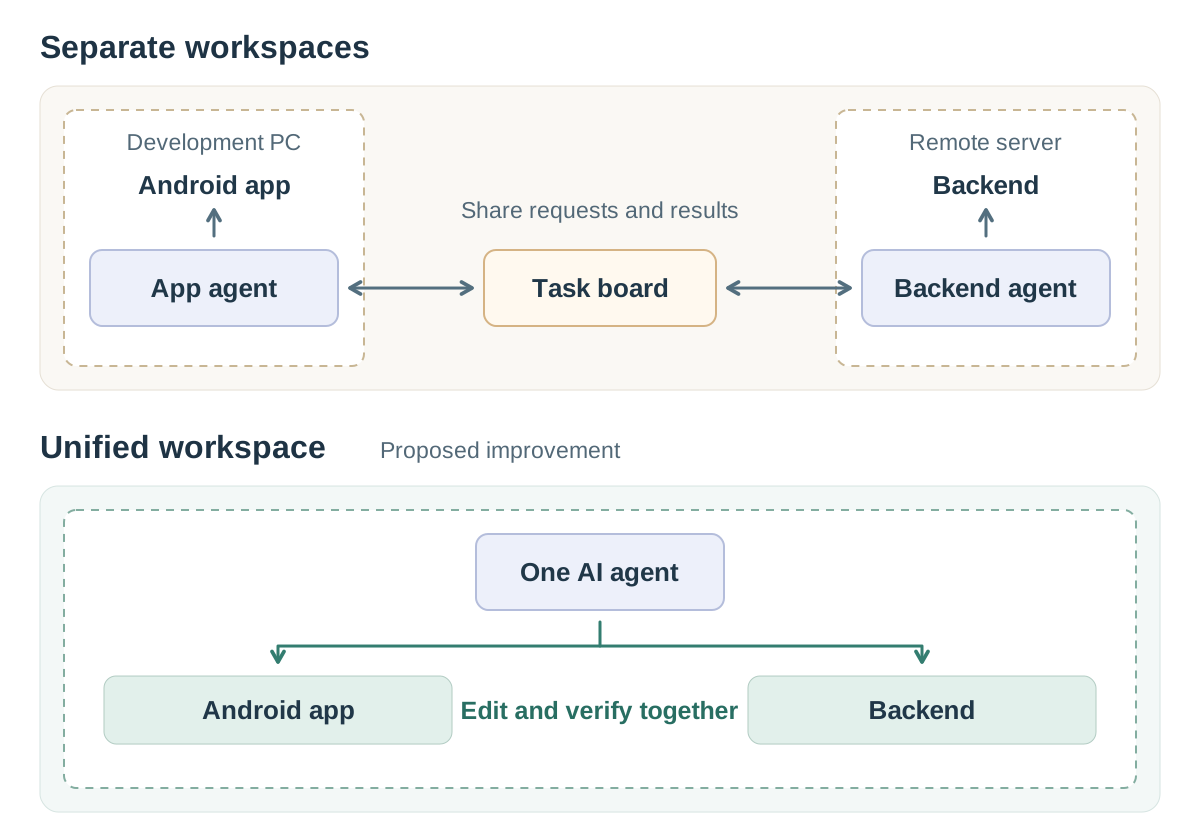
What matters is an environment where AI can finish its assigned work without human intervention.
3. What to Avoid in AI Coding
3.1. Simply Relaying AI’s Answers
If a step consists only of forwarding AI’s answers without reviewing them, consider whether that step can be removed.
For example, a team lead may ask AI to plan work or identify project improvements, then forward the answer unchanged to team members. In that case, it would be better to give the team members the original prompt.
Some developers also report completion as soon as AI does, without verifying the result. This shifts verification to other people and harms the team.
Once, a team member insisted that he was right because “someone I know said so.” I was momentarily at a loss. What was I supposed to do with an endorsement from someone I did not even know?
Now people say, “AI said this is right.” Using an unreviewed AI opinion as evidence is another form of merely relaying its answer.
Developers should remember that continually forwarding AI’s responses can make their own role unnecessary to the team.
3.2. Generating Pointless Documentation
I often see both developers and nondevelopers using AI to document every small detail, as if making up for years of frustration with poor development documentation.
I think there are two main reasons for unnecessary documentation.
One is the belief that having a document is better than having none: a vague hope that it will help someone.
The other is avoiding responsibility: being able to say that the information was documented and that anyone who missed it is at fault for not reading it.
In both cases, the people creating the documents often do not read them themselves.
Documentation that cannot be executed should be kept to a minimum. There is no guarantee it will be updated whenever the code changes.
Instead of describing rules and procedures in documents, it is better to write scripts, configure linters, or create tests.
Information worth documenting includes the overall architecture and design intent: things that are hard to infer from code alone and do not change easily.
Keep individual tasks’ progress and completion reports in the task tracker.
With AI coding, you can ask AI a question and have it analyze the code whenever needed, so the source code itself serves as documentation. Information that is easy to obtain by analyzing the code should not become a separate document.
3.3. Rolling the Dice
Team leads usually assign work with each person’s abilities in mind. They occasionally assign a task beyond a team member’s current abilities, but in that case they do not blame the person for failing.
Some developers complain bitterly when AI’s output disappoints them. If the result differs from what you expected, examine what may have been wrong with your instructions.
Asking AI to redo a task until you like the result, without addressing the cause of the problem, is like rolling dice. A few retries may produce what you want today, but as the project becomes more complex, you will need increasingly good luck.
The more you rely on luck, the more control passes to AI. Eventually, steering the project as you intend becomes difficult.
3.4. Allowing Access to Production
Some people give AI access to production and ask it to deploy changes or respond to incidents. But AI can make mistakes at any time.
You might think blocking database access is enough. Yet AI could modify backend code and change data through the application.
Read-only access is not grounds for complete confidence either. A permission error may have included write access, or another tool or account may still allow modifications. AI might try another route to finish its task and cause unintended changes.
If AI can access production, assume that some kind of incident will eventually occur.
Human error or defects can defeat safeguards, so safeguards need multiple layers. The starting point is preventing AI from accessing production.
4. How Developers Should Learn
If AI handles implementation, what should developers learn, and what experience should they build?
4.1. Focus on Software Engineering Fundamentals
Until last year, I told team members interested in practices such as design patterns and TDD that studying them would bring little recognition or fair evaluation.
Few developers understand software engineering well enough to assess that ability properly. An interest in design patterns could even be viewed negatively. Developers familiar with a variety of technologies—React, Vue, Java, Node.js—were often valued more highly.
Software engineering was important before, of course. Its importance was simply less apparent in small projects.
AI completely changed my view. Keeping up with its implementation speed requires software engineering skills such as design and test automation. Meanwhile, it has become difficult to compete with AI on implementation technologies such as React or Java.
Software engineering is particularly difficult because its areas of knowledge are interconnected. Applying TDD in an object-oriented project, for example, requires a deep understanding of OOP, analysis, and design. Without understanding the connected concepts, applying a technique may do little to improve productivity.
AI may have made development easier, but it has raised the level of skill required of developers.
4.2. Write Code Yourself
With AI doing the implementation, opportunities to code manually have almost disappeared. But we still need the experience of writing code and thinking through what could go wrong, the strengths and weaknesses of the current structure, and whether a better structure is possible.
From functions and classes to modules and systems composed of several services, good structure follows shared principles: low coupling and high cohesion. The thinking developed through manual coding also informs decisions about larger structures. That experience allows you to anticipate problems without reading every line AI writes and to direct it to investigate.
You also need to write tests yourself to understand what makes them efficient and meaningful. Without that experience, you may struggle to recognize a problem even as AI produces mountains of useless tests.
Repeatedly building only the initial version of a new project can leave you revisiting the same questions. I recommend gaining experience by repeatedly improving the structure of one project.
Once a project works without problems, you may see no reason to change it further. In a learning project, however, what matters is how well it is built. There is no end to building it better. Even when repeated revisions feel tedious, keep examining what could be improved.
There are no shortcuts to learning. You grow by thinking problems through.
5. Closing Thoughts
AI has not fundamentally changed the development process. Analysis, design, implementation, and verification remain. The change feels substantial to individual developers because what they personally need to do has changed.
When implementing manually, we could get work done by concentrating on the language or framework used in our own area. On small projects, methods such as TDD were not essential, and even with insufficient design, we could somehow resolve problems by editing the code ourselves.
Design, test automation, and systematic task management were already more necessary on large projects. Now, even a project developed by one person delegating implementation to AI can grow rapidly. The fundamental difficulty of AI coding is that individual developers are suddenly expected to have the skills to handle that scale.
As AI coding becomes widespread, anyone can develop software to some extent. A developer’s value in this environment lies in the ability to steer AI in the intended direction. The place for developers who merely follow AI without judging or verifying its work will quickly disappear.
Some Personal Thoughts
Will developers disappear?
AI’s progress is remarkable. Some claim AGI has already been achieved; others say it is close. But can AI sustain its current pace? That remains to be seen. I find it difficult to conclude from today’s achievements alone that AI will surpass human thinking across the board.
With further progress, the profession of software developer may eventually disappear. But I suspect that if AI can fully replace developers, few other occupations will remain either. If you enjoy development, there is reason to keep going.
Are junior developers no longer needed?
We hear about reduced entry-level hiring not only in software but also in law and accounting. I think AI has reduced immediate demand for people, rather than eliminated the need for juniors.
As development becomes easier, projects will grow larger, and developers capable of managing that scale will remain necessary.
Until now, many people have found developer jobs after completing a six-month training course. In the future, even studying hard through a four-year university degree may not be enough to acquire the necessary skills. Personally, I welcome the shift toward greater professional expertise.
Can junior developers compete with senior developers?
Experience with several languages and frameworks does not provide a major advantage in AI coding. Among the senior developers I have met, few have consistently developed software engineering skills such as design and testing. I believe juniors who acquire those skills have a chance to compete.
Previous: Understanding AI Coding (1): How AI Changed the Development Environment